
1. Register a sender number
South Korean carriers require you to register your sender number before you send text messages as part of their spam prevention policy. The registration system is based on Article 84-2 of the Telecommunications Business Act, which addresses false caller ID and user protection.
1-1. Prepare the required documents
1. Telecom service subscription certificate
The certificate confirms who is registered to use the phone number. Call your carrier to request it.
2. Authorization to use the phone number
- Download the authorization form from Grey Box and fill in the required information.
- Enter
주식회사 그레이박스as the account holder in the계정 명의자 정보field.
3. Business registration certificate
1-2. Register the sender number in Notifly
-
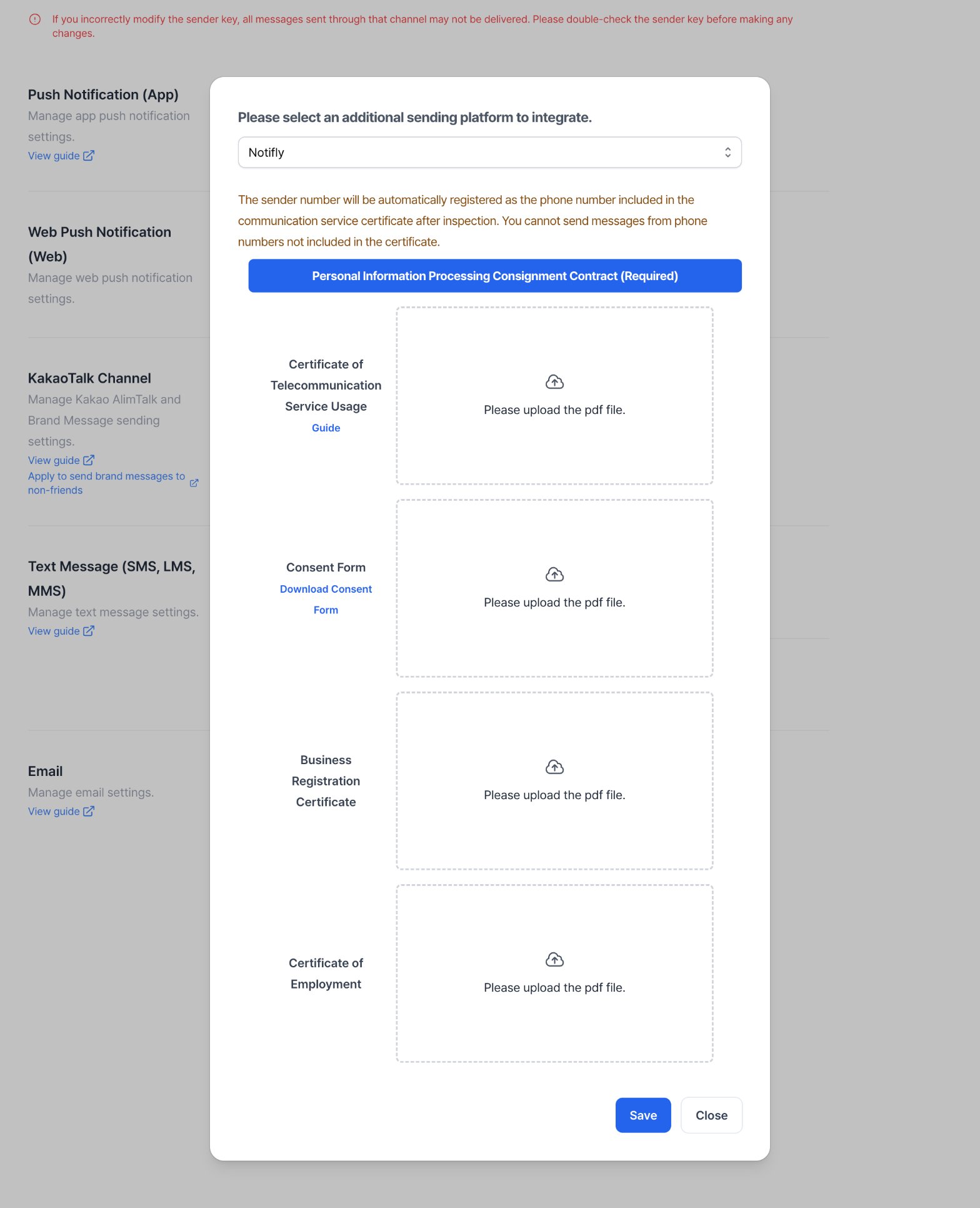
Sign in to Notifly and verify your phone number if needed. Open Settings > Channel Settings > Text Message (SMS, LMS, MMS). To register your first sender number, click Register. If you already have a registered number, click the plus icon next to the sending platform.

- Select Notifly as the platform. Open Personal Information Processing Consignment Contract (Required) and complete the form.
- Attach the documents from section 1-1 as PDFs. Also attach a Certificate of Employment, which is required by the form. Click Save to submit.
2. Send a test text message
When creating a campaign, send a test text to check that you can send messages with your registered number.- Text messages don’t support emoji. See Text message format FAQ.
- If the carrier flags a message as spam, check the carrier’s spam service. The message might not appear in the phone’s spam folder. See Spam blocking by carrier (Korean).
3. Set up an 080 opt-out number (optional)
For advertising text messages in South Korea, obtain the consent required by law. Start the message with(광고), identify the sender, and give recipients a free way to opt out. See the KISA guide to South Korea’s anti-spam rules. To request an 080 opt-out number, email contact@notifly.tech or use your dedicated Slack channel.
- Confirm the current monthly fee for each 080 number before you request one.
- Allow three to four business days to get your 080 number.
- Notifly applies the 080 opt-out list to text messages with Is Advertising Message turned on.
- Confirm which Kakao fallback sends use the 080 list for your project.
- You can also manage the 080 opt-out list through the API. See List, add, and remove opt-out recipients.
-
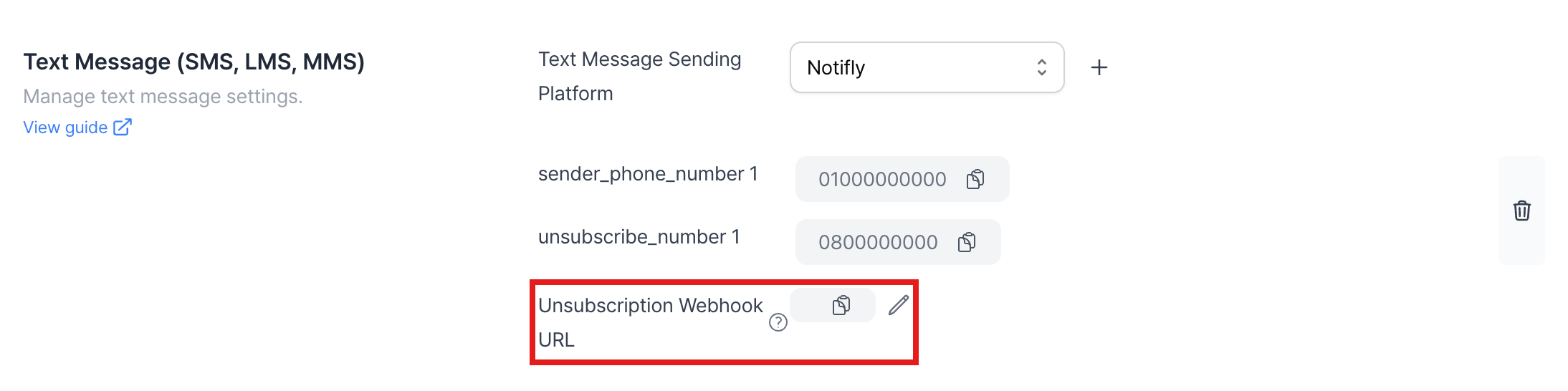
You can receive a webhook when a number is added to the opt-out list.
-
You can receive a webhook when a number is added to the opt-out list.
4. Track text message link clicks
Text messages don’t report link clicks by default. Use the Tracking Link add-on to count clicks.Check the current rate per click for your project before using tracking links.
Tracking links are available for LMS and MMS only.
Set up a tracking link
- Create a campaign and set the send timing and audience. In Message and Action, select Tracking Link.
- Enter the destination URL.
- Click 링크 추가 (Add link) to insert the generated link in your message.
- Leave the generated link unchanged. Notifly sends the shortened tracking URL in place of the destination URL.
5. Receive delivery results through a webhook
Notifly can send your server delivery results for SMS, LMS, and MMS that it sends through NHN. For each reported campaign or user journey event, the webhook sends one JSON payload per message. It reports whether Notifly sent or skipped the message, or whether the send failed. It doesn’t report whether the recipient read it. The webhook also reports results when Notifly sends a text after a direct Kakao integration fails to send a message. It covers only texts sent through Notifly, including these fallbacks. The 080 opt-out registration webhook is separate.Set up the webhook
- Prepare a publicly reachable HTTPS endpoint that accepts a
POSTrequest with a JSON body. - Open Settings > Channel Settings > Text Message (SMS, LMS, MMS). If Text message delivery result webhook URL is available, enter the endpoint URL and save it.
- If the field isn’t available, send your project ID and endpoint URL to your dedicated Slack channel or customer support.
text_message_delivery_result_webhook configuration. The public API doesn’t accept it as a request body.
Events
Notifly doesn’t report
pending or requeued__forbidden_timing (successful rescheduling). If rescheduling fails, it reports skipped__forbidden_timing_requeue_failed.
The webhook also leaves out results that lack a message ID or the campaign or user journey identifiers. It therefore reports only some internal errors and exclusions.
When the failure reason is available, Notifly includes it in failureReason.
Request body schema
The payload doesn’t include the message body.
Example: Successful text message send in a campaign
Example: Successful fallback text send in a user journey
Notifly sends separate channel results for the Kakao message and the fallback text. UsechannelType and metadata.isFailover to identify the fallback result.
Can I register multiple sender numbers?
Can I register multiple sender numbers?
Yes. Submit the required documents for each sender number you add to the project.
Can I use an 080 opt-out number from another provider?
Can I use an 080 opt-out number from another provider?
You can use an externally issued 080 opt-out number in Notifly under the following conditions.
- Notifly doesn’t automatically apply an external opt-out list when sending promotional texts, including fallbacks. Use a custom user property to filter recipients yourself.
- Add the Korean advertising label
(광고)and your 080 opt-out number to the message.