
The console’s Catalogs menu is available for products on the Pro plan or higher.
Choose a data source
- Google Sheets. Manage data in a spreadsheet. Notifly syncs the entire range you select at each scheduled sync and stores all fields as strings.
- API. Manage the schema and items from a server using the Catalog REST API. Supported types are
string,number,boolean,time,geo,object, andarray.
Connect Google Sheets
1. Prepare the spreadsheet
Notifly uses the first nonempty row as the header.- Name the first column
id. - Each header must be nonempty and unique, with a maximum of 250 characters.
- Item IDs and headers can contain only the letters A–Z and a–z, digits 0–9, hyphens (
-), and underscores (_). - An item
idmust be unique within the catalog and contain no more than 250 characters. Use a stable internal ID that stays the same if product details change. - A nonempty row with a missing or duplicate
idcauses the sync to fail. - Notifly skips completely empty rows and reports an error if any row has more values than the header.
- Notifly stores each value as a string exactly as it appears in Google Sheets. Check how the sheet displays prices and dates. Use an API catalog if you need comparisons between numbers or fields that contain arrays.
2. Create a catalog
- In the console, open Data Management > Catalogs.
- Click Create catalog and select Google Sheets as the source.
- Enter a catalog name that is unique in the project. Use a short name such as
productsthat you can use in a Liquid tag. You can use up to 250 characters from A–Z, a–z, 0–9, Korean characters, hyphens, and underscores. - Enter the Spreadsheet ID. To limit the import to a tab or range, enter a Tab name or an A1 range. If you fill in both, they must refer to the same tab. If you leave both blank, Notifly reads the entire first tab.
- In Google Sheets, share the file with
catalog-reader@notifly.techas a Viewer. - Set the Sync frequency and Schedule timezone, then click Create catalog. The first sync starts immediately.
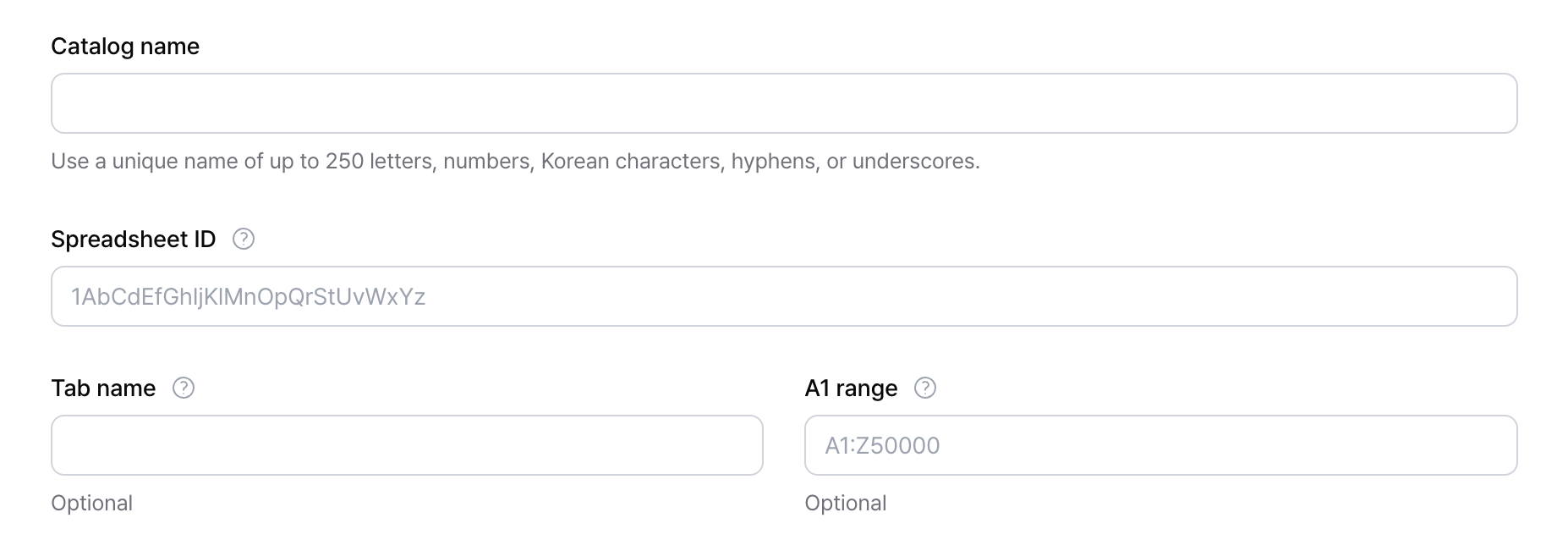
/d/ and /edit.
https://docs.google.com/spreadsheets/d/1AbCdEfGhIjKlMnOpQrStUvWxYz/edit is 1AbCdEfGhIjKlMnOpQrStUvWxYz. Enter an A1 range such as A1:Z50000 or Products!A1:Z50000.
3. Choose a sync schedule
Use No recurrence to turn off automatic sync. To sync automatically, choose Every 15 minutes, Every 30 minutes, Hourly, Daily, Weekly, or Monthly. The schedule runs in the timezone you select. When you specify a time, set the minute to00, 15, 30, or 45. Monthly schedules support days 1 through 28.
- The recurring schedule stays in effect after the initial sync and after Sync now.
- Editing the source changes the catalog status to Pending sync. The new settings take effect after the next scheduled sync or when you click Sync now.
- If the source data has not changed, the history shows No changes.
- If a sync fails, Notifly uses the last successfully synced data if available. Check the sharing permissions and the sheet’s headers and rows, then retry the sync.
- A disabled catalog is excluded from automatic and manual syncs and from message lookups.
4. Review sync results
When the sync finishes, open the catalog details.- Check the Status and Rows.
- Open Preview items and check that the IDs and key fields on each page match the spreadsheet.
- Open Sync history and check Trigger, Started at, Finished at, Rows, Size, and Status. The status can show Success, No changes, or Failed.
- If the sync failed, check the sharing permissions and the spreadsheet format. Verify the
idcolumn, headers, and rows. After fixing the issue, click Sync now.
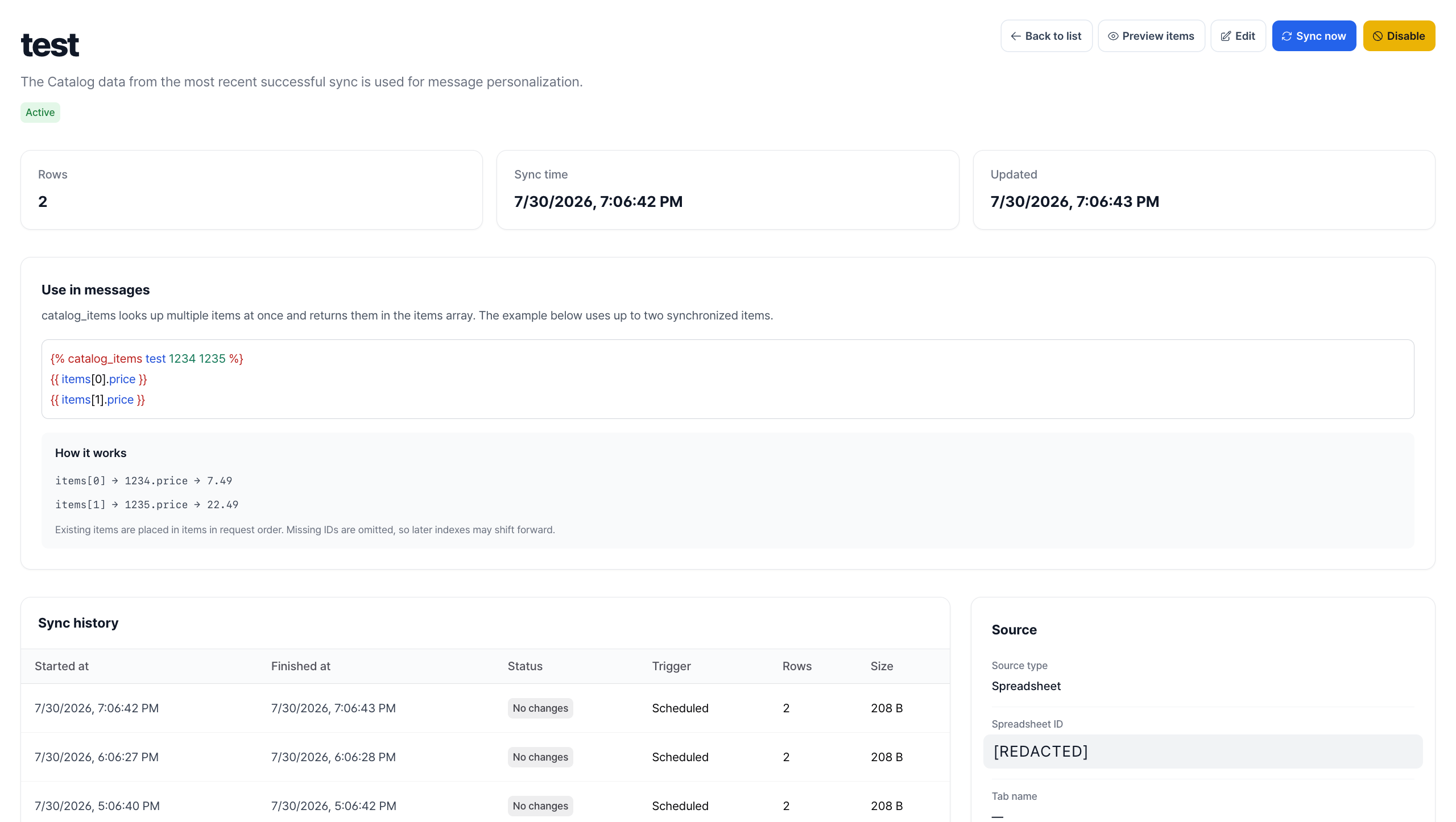
5. Edit the source or catalog name
On the catalog details page, click Edit to change the name, spreadsheet ID, tab, A1 range, or sync schedule.- If you change the source or range, click Save changes and review the sync result again.
- If you rename the catalog, update existing
catalog_itemsandcatalog_selection_itemstags in campaigns and user journeys to use the new name. - Changing source rows or values does not start a campaign or user journey. Set up a campaign or user journey that uses the catalog.
6. Disable or delete a catalog
Choose whether to disable the catalog and keep its data or delete it permanently. Before you click Disable, check which messages use this catalog.- Click Disable to stop Liquid lookups and both automatic and manual syncs. Notifly keeps the catalog data and sync history. After disabling the catalog, the only remaining action in the console is permanent deletion.
- Click Delete and then Delete permanently in the confirmation dialog to remove items and sync history from the database. This action is irreversible.
Create an API catalog
To create an empty catalog with just theid:string field, select API as the source in the console. Then add fields and items through the REST API. You can also create the catalog and its schema in one REST API request.
To create the catalog through the API, first get an API authentication token. Then send the following request.
{ "name": "id", "type": "string" }. After you create the catalog, you can add up to 50 items in one request.
Use catalog items in messages
In the message editor, pass the catalog name followed by the item ID to thecatalog_items tag. Liquid stores the result in the items array.
Supported campaigns and channelsScheduled and event-based campaigns and user journeys support catalogs in mobile push notifications, web push notifications, SMS, Kakao Alimtalk, Kakao Brand Message, and webhooks.In-app and web popups also support catalogs in event-based campaigns and user journeys. You need the new popup editor and an SDK version that supports personalization. See the in-app popup and web popup creation guides.API-triggered campaigns do not support catalog lookups on any channel. In this case,
items is an empty array. Direct sends through the API also skip catalog lookups. Look up the values yourself and add them to the message before calling the API.Event-based campaigns
If an event parameter contains a product ID, read it fromevent.
event for event-based campaigns.
User journeys
When an event starts a user journey, read parameters from that event usingentry_event.
Look up multiple items
Separate IDs with spaces to look them all up in one tag. You can pass user properties or event parameters as IDs.items.size or loop through the results with for before using a value. If no items match, show fallback text or use abort_message to stop the send on channels that support it.
Calling a catalog tag again in the same message replaces the contents of items with the new results.
If a catalog field contains Liquid syntax and you want to render it as well, use :rerender.
:rerender only with trusted template values.
Use selections
Use filters, sort order, and a result limit to define a selection for an API catalog. You can create up to 30 selections. Each selection supports up to 4 filters and 50 results. The available operators depend on the field type.string:equalsordoes not equal.number:equals,does not equal,greater than, orless than.boolean:is.time:beforeorafter.array:includes valueordoes not include value.
geo and object fields and reject null as a value.
Troubleshooting
Why do I see a Google Sheets permission error?
Why do I see a Google Sheets permission error?
Check the sharing settings to verify that
catalog-reader@notifly.tech has Viewer access. Check the spreadsheet ID and tab name too.Why do I see a data validation error?
Why do I see a data validation error?
Verify that the first column is named
id in lowercase and that each header is nonempty and unique. Item IDs and headers can contain only the letters A–Z and a–z, digits 0–9, hyphens, and underscores. A data row with more columns than the header also causes the sync to fail.Why haven't my messages changed after I edited the spreadsheet?
Why haven't my messages changed after I edited the spreadsheet?
Spreadsheet changes take effect after a sync. Wait for the next scheduled sync or click Sync now. Then check the last sync time and open Preview items on the catalog details page.
Are restock or price drop messages sent automatically?
Are restock or price drop messages sent automatically?
Changing a catalog value does not trigger a message. Send a restock or price drop event to Notifly and set that event as the campaign or user journey trigger. Use the catalog to look up values to display, such as the product name, price, or link.
Limits
- Active catalogs per project: 20
- Fields per Google Sheets catalog: 1,000, excluding
id - Fields per API catalog: 500, including
id - Fields per add request: 50
- Items per create, update, or delete request: 50
- Stored size per item: 1 MiB
- Stored size per catalog: 2 GiB
- Total size of active catalogs per project: 15 GiB
- Catalog names, field names, and item IDs: 250 characters
- Strings: 5,000 characters
- Arrays: 100 strings
objectandarraynesting: 50 levels. Object keys cannot contain.or$.- Google Sheets source size per sync: 100 MiB
- API JSON request body: 4 MiB