1. Campaign metrics
1-1. Send success
Notifly successfully sent the message using the recipient’s contact information or device token.1-2. Send failure
Notifly could not send the message. For example, the phone number or push token might be invalid. In legacy Kakao Friendtalk campaigns, this also included recipients who had not added the KakaoTalk channel as a friend or did not use KakaoTalk.1-3. Delivery
The message reached the user’s device.1-4. Open
The user opened the message.1-5. Click
The user clicked a link or another clickable element in the message.1-6. Conversion
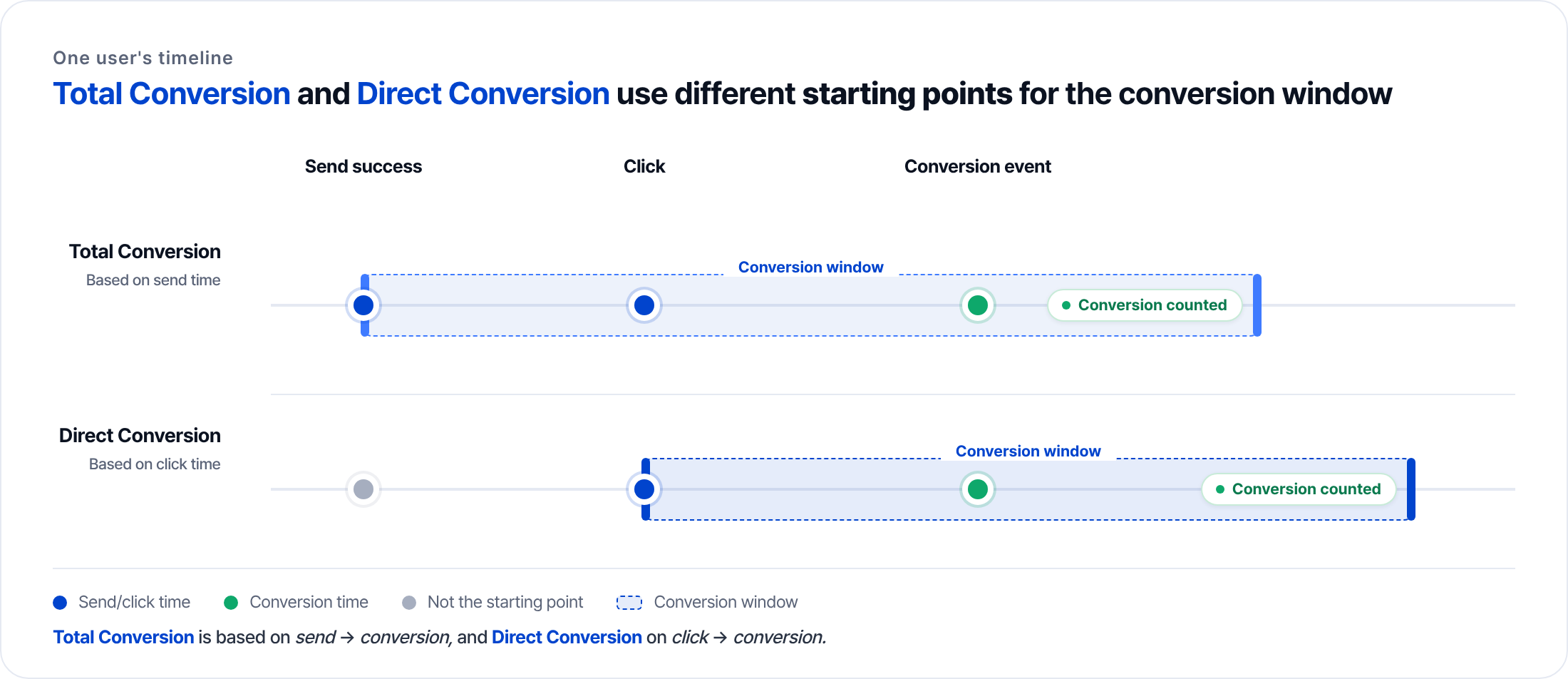
To track conversions, set a conversion event for the campaign. Notifly counts eligible events in your app or website when they occur within the attribution window. See Analysis configuration for setup. See How conversion attribution works for details.2. Metrics by channel
3. How conversion attribution works
3-1. Conversion types
- Total conversions count eligible events that occur within the attribution window after a successful send or a popup display.
- Direct conversions count eligible events that occur within the attribution window after a recorded click.
In supported Kakao BizMessage, LMS, and MMS campaigns, Notifly can count a conversion after a tracking link click. The click must identify the campaign and recipient, and the configured event must occur within the attribution window. For an A/B test, the link must also identify the variant.