
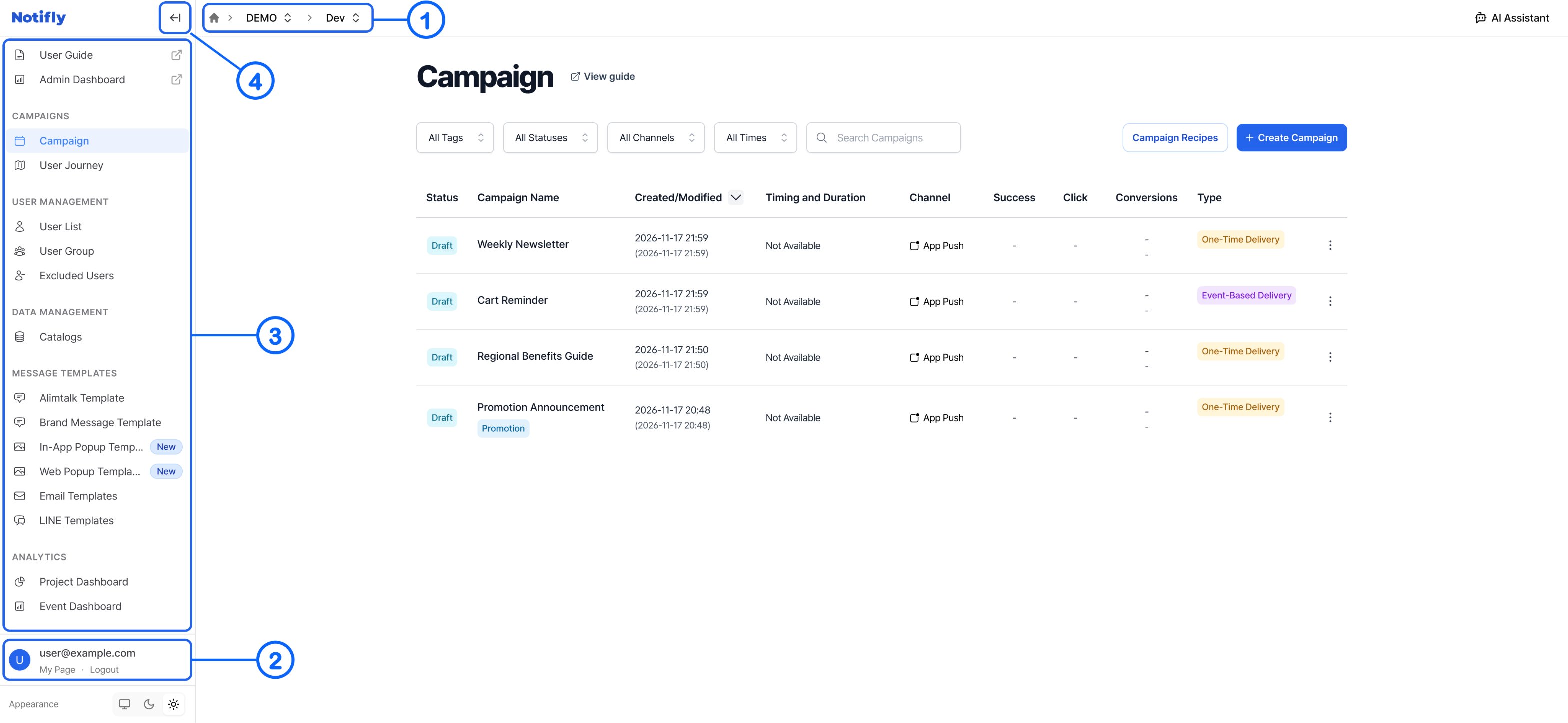
1. Top navigation
Use the console header to select a product or switch environments.Product list
On desktop, click the home icon in the header to return to the product list.Current product and environment
The header shows your product and the current environment, Prod or Dev.Use the environment selector in the header to switch between production and development. Each environment has its own data.
2. User account
At the bottom of the sidebar, click My Page to view your account or Logout to sign out.- On My Page, you can manage basic account information, one-time password (OTP) settings, and the language shown in the console.
3. Left sidebar
The sidebar shows the menus available for your plan, project settings, and permissions.Pinned link
- User Guide opens the Notifly documentation.
Main sections
-
Campaigns
- Campaign. Create a campaign or open an existing one.
- User Journey. Create a user journey or open an existing one.
-
User Management
- User List. View and register users.
- User Group. Create and manage groups based on segment criteria for campaigns and user journeys.
-
Excluded Users. Choose which users to exclude from each messaging channel.
Access to this section may be restricted for users with the member role, depending on the product’s permission settings.
-
Data Management
- Catalogs. Manage catalogs for message personalization.
-
Message Templates. Create and manage templates by channel.
- Alimtalk Template for Kakao Alimtalk.
- Brand Message Template for Kakao Brand Message.
- In-App Popup Templates for in-app popups.
- Web Popup Templates for web popups.
- Email Templates for HTML email.
- Line Templates for LINE in eligible projects.
-
Analytics
- Project Dashboard. Review user and device data and browse events and user properties.
- Event Dashboard. Review event history and parameters for the selected period. The dashboard shows up to 2,000 occurrences for each event.
- Event Monitoring. Monitor up to 2,000 events collected by the Notifly SDK.
- Delivery Results. Check how your messages were delivered.
- Message Data Viewer. Filter, group, and export message performance data.
-
Settings
- Payment History. Review past payments and individual invoices.
- Members Management. Add or remove members and assign permissions.
- Settings. Manage product and project information, channels, the SDK, and external integrations.
Access to this section may be restricted for users with the member role, depending on the product’s permission settings.