
- Cohort sync requires a paid Mixpanel plan.
- The Mixpanel integration is available on Notifly’s Pro and Enterprise plans.
- Send a reminder with a discount to users who left items in their cart.
- Introduce a new feature through in-app popups and push notifications to users who haven’t tried it.
- Send a series of personalized messages, such as offers or updates, to users who haven’t opened the app in at least 30 days.
Before you start
- Notifly matches each member’s Mixpanel distinct ID (
mixpanel_distinct_id) to a Notiflyexternal_user_id. - Before syncing a cohort, make sure the users you want to target already have matching IDs in Notifly.
- Mixpanel allows up to 60 recurring syncs across all destinations in a project.
- Notifly stores cohort membership as a user property.
If you are setting up a new webhook destination, ask Notifly support to verify the fields your Mixpanel project sends before starting the sync.
1. Get your Notifly credentials
- In the Notifly console, open Settings > Product & Project.
- Copy your Project ID.
- Under API Credentials, copy your Access Key. Copy the Secret Key from the dialog that appears when you create or renew it. For an existing Secret Key, ask your development team.
Store the Secret Key only on the server. Notify your development team before renewing it.
2. Add a webhook in Mixpanel
For the latest screenshots, see Mixpanel’s guide to custom webhook destinations.- In Mixpanel, select Data > Destinations.
- Click Add Destination, select Webhook, and click Connect.
- Enter the connection name and webhook URL. Enable Basic Authentication, then enter your Access Key as the username and your Secret Key as the password.
Your project ID and access key are available in Settings in the Notifly console.Copy the Secret Key before closing the dialog that appears when you create or renew it. To get an existing key, ask your development team.
3. Send the cohort
- In Mixpanel, open Lexicon > Cohorts.
- Open the three-dot menu next to the cohort and select Export to… > Webhook.
- Select the custom webhook you created for Notifly.
- Choose a one-time export or a recurring sync. If Mixpanel displays Properties to Export, select the fields you confirmed with Notifly support for this webhook destination. Additional properties do not change the ID Notifly uses to match users.
- Click Start Sync.
The first recurring sync sends the full cohort. Later syncs send only users added or removed.
4. Verify the cohort in Notifly
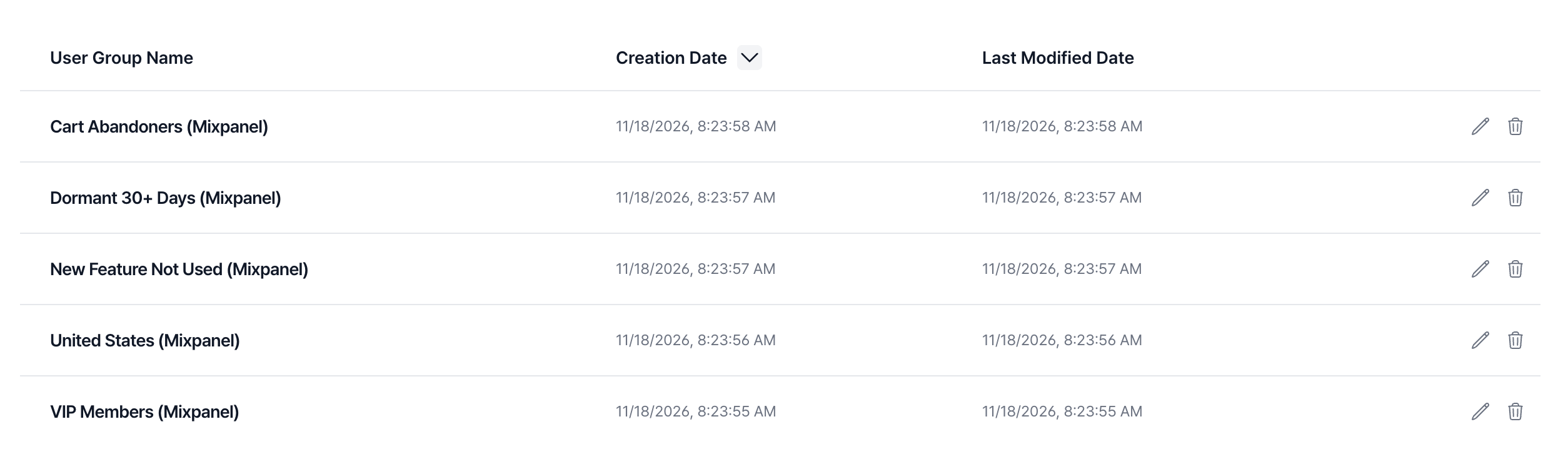
After you send the cohort, open User Management > User Group in the Notifly console. Look for the cohort name followed by(Mixpanel).
Notifly adds only users it can identify.For example, Cohort 1 contains users A, B, and C. If only A and C have matching
external_user_id values in Notifly, the new user group contains only A and C.FAQ
Can I use cohort sync and event export together?
Can I use cohort sync and event export together?
Yes. You can set up and use both features independently.
Why does my user count differ from the count in Mixpanel?
Why does my user count differ from the count in Mixpanel?
Notifly adds only users whose Mixpanel distinct ID matches an
external_user_id in Notifly. Check that the Mixpanel distinct ID is the same as the user ID you send to Notifly.Which sync type should I choose?
Which sync type should I choose?
- Use Recurring sync to keep the audience up to date, such as for cart abandonment reminders.
- Use One-time sync to use the cohort as it was at export time, such as for a campaign based on a monthly report.
Can I sync multiple cohorts?
Can I sync multiple cohorts?
Yes. Each Mixpanel cohort appears as a separate Notifly user group.
Can I edit a synced user group manually?
Can I edit a synced user group manually?
You can’t edit a synced user group directly in Notifly. Edit the cohort in Mixpanel and sync it again.
Is there a limit on recurring syncs?
Is there a limit on recurring syncs?
Mixpanel allows up to 60 recurring syncs per project across all destinations. Remove any syncs you no longer use.
Why can't I find my synced cohort in Notifly?
Why can't I find my synced cohort in Notifly?
The first sync can take 20 to 30 minutes. If the cohort still does not appear after 30 minutes, contact Notifly in your dedicated Slack channel or email contact@notifly.tech.